|

|
| WHAT’S NEW FOR YOUR AUDIENCE |
|
|
Updated Desktop Player
The desktop player now
spans the full width of the
browser window and has a
refreshed design that mirrors
our mobile app and recent
embed updates (more below).
We’ve also improved iconography,
including clearer expand
and collapse controls, to
make navigation more intuitive.
The result is a consistent
and seamless experience for
your audience across desktop,
mobile, and embeds.

|
|
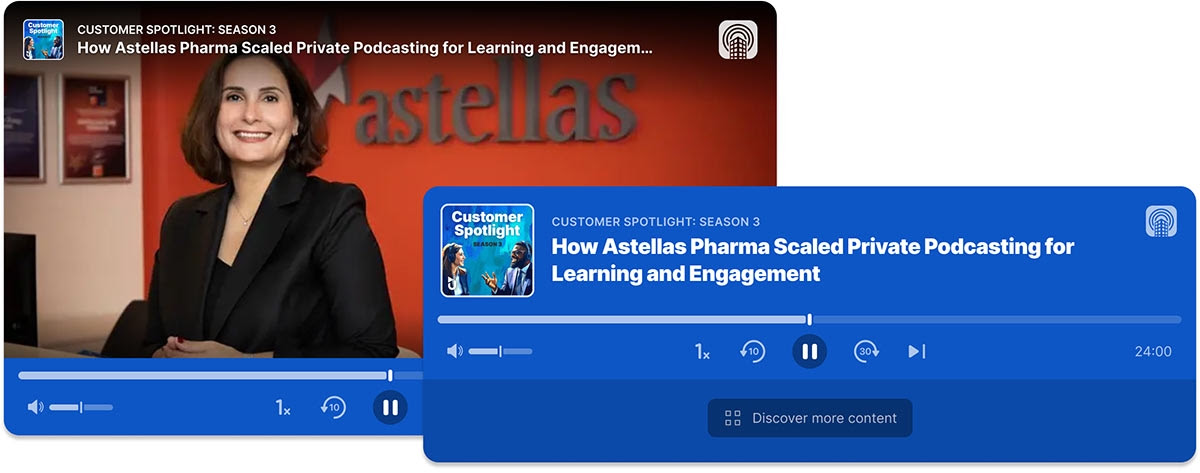
Enhanced Single Episode Embeds
We’ve updated the design of single episode embeds (Easy
Embeds), giving them a visual
refresh that aligns more
closely with the in-app experience
and provides a consistent
look and feel wherever your
audience engages.
|
|
Coming Soon: Recently Played
We’re in the process of adding
a Recently Played list
to each user’s My Library.
This feature makes it easy
for users to pick up where
they left off, revisit valuable
content, or quickly find
episodes they want to share
with coworkers.
|
|
Coming Soon: Save For Playing or Re-Playing Later
Users have shared that the
desire to Save content for
later feels more intuitive
than a generic Playlist concept.
To reflect user feedback
and align with familiar patterns,
we’re rebranding Playlist to Saved. Soon,
when users want to
revisit content, they’ll
simply choose to “Save” it.
This update introduces clearer
terminology and iconography
while being better suited
to enterprise content. Whether
the goal is to play later,
replay later, or share later,
the Save list makes it simple.
|

|
|
|
Coming Soon: Show Embeds with SSO
In September, you’ll be able
to generate a show-level embed
code directly
from the Show screen in the
uStudio Management Console.
These new embedded experiences
let you place full shows
in third-party applications,
automatically refreshing
when new episodes are published.
For your audience, this means
playback progress and profiles
stay consistent across mobile,
desktop and embeds, creating
a seamless experience anywhere
content is played. For admins,
it delivers the same detailed
analytics you expect from
the rest of the uStudio ecosystem.
|
|
One Show for All Media
We’ve improved our media
management for shows. Admins
no longer need to specify
audio or video – we’ve removed the concept of a show type altogether
when creating new shows.
Now, a single show supports
both formats and our applications
natively respond to streaming
requirements for each. We’re
pretty happy with this optimization,
hope you are too!
|
|
Admin Essentials Pilot Show
We’re piloting a new Admin
Essentials show featuring
short episodes with quick
insights and how-to’s for
using both our audience and
admin apps. This series is
designed to help you bring
on new admins efficiently
and effectively. If you’d
like to join the pilot distribution
for this series, please contact
success@ustudio.com.
|
|
Audience Quick Start Guides
We’ve created new quick start guides for
both the mobile and desktop
apps. These are perfect for
launching our apps to new
audiences, onboarding new
employees, or reintroducing
the application. You can
download the guides from
our knowledge base and share
them directly with your audience
or use them to create your
own.
|
|
|


